Version 1.0.0
What’s new →The sweep shows what happened.
SonaLink shows why.
SonaLink runs beside Sonasync and watches every amplifier and processor while you measure — temperature, mains, load, current, limiter, clip and protect. Then it hands that record to Sonasync, so a dip in a sweep comes with its reason: SUB L was limiting 4.5 dB.
Windows 10 or later, and Linux · monitoring always free · thirty days of recording · no account, no telephone home
What it does
Eyes on the equipment, while the mic is listening
A measurement tells you the system is 3 dB down at 60 Hz. It does not tell you the sub amp was limiting, that one channel had dropped to protect, or that the generator sagged to 205 V. SonaLink does — and it timestamps it on the same clock as your sweeps.
- Reads amplifiers, processors and powered speakers over the network or RS-232.
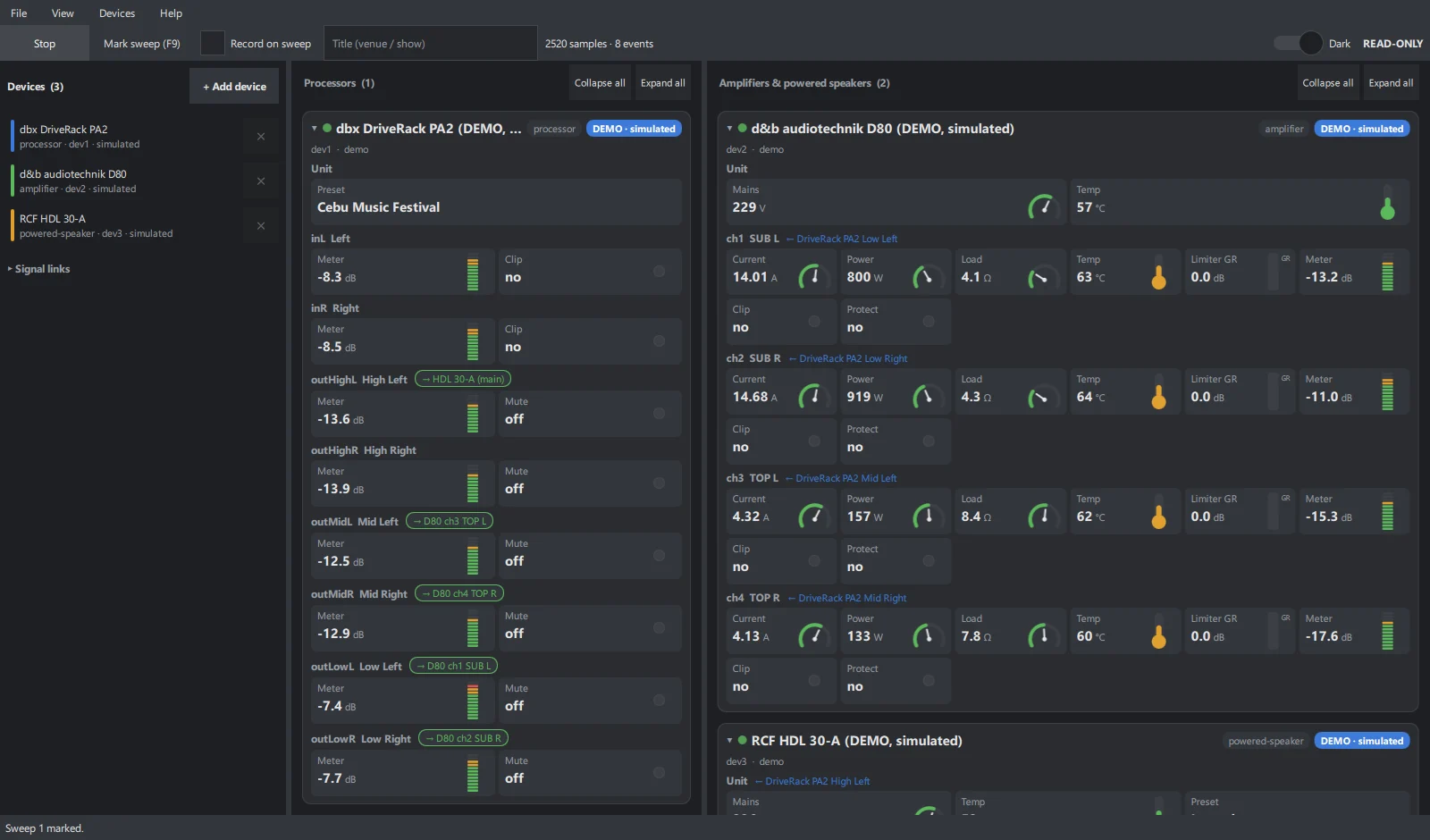
- Shows every one as a live card: needle gauges, thermometers, VU bars, LEDs.
- Records it all, with a 10-second pre-roll and optional sweep markers.
- Hands it to Sonasync as one
.sonalinkfile.
What a recording holds
| When | Millisecond timestamps on the laptop clock Sonasync uses |
| What | Each device, its channels and their names |
| Where | Which processor output feeds which amp |
| Why | Temperature, mains, current, power, load, limiter, clip, protect, faults — and every event |
| How | Where each value came from, and how far to trust it |
The cards
Processors on the left. Amplifiers on the right.
The link between them lights up.
Each reading has its own indicator, and each one moves. Tell SonaLink that PA2 Low L feeds D80 ch1, and the output carries a chip coloured by that amplifier channel’s state — amber when it limits, red when it clips or protects. Many engineers simply leave SonaLink open through the show.
Needle gauge
Mains voltage, load impedance, current, power
Thermometer
Heatsink and channel temperature, green to red
VU bar
Input and output level, with peak hold
Gain-reduction bar
How hard each limiter is working
LEDs
Clip, protect, mute and faults — pulsing when active
With Sonasync
One file, one direction.
Sonasync stays air-gapped.
- Run SonaLink beside Sonasync on the same laptop and add your devices.
- Press Start recording before the first sweep — it reaches back 10 seconds.
- Measure in Sonasync as always. Press F9 to mark a sweep, if you like.
- Stop and Save. One
.sonalinkfile. - Import it in Sonasync, which cuts each sweep’s window by its own time.
Sonasync never opens a connection to SonaLink or to anything else. The shared Windows clock lines the two up; the file is the only bridge.
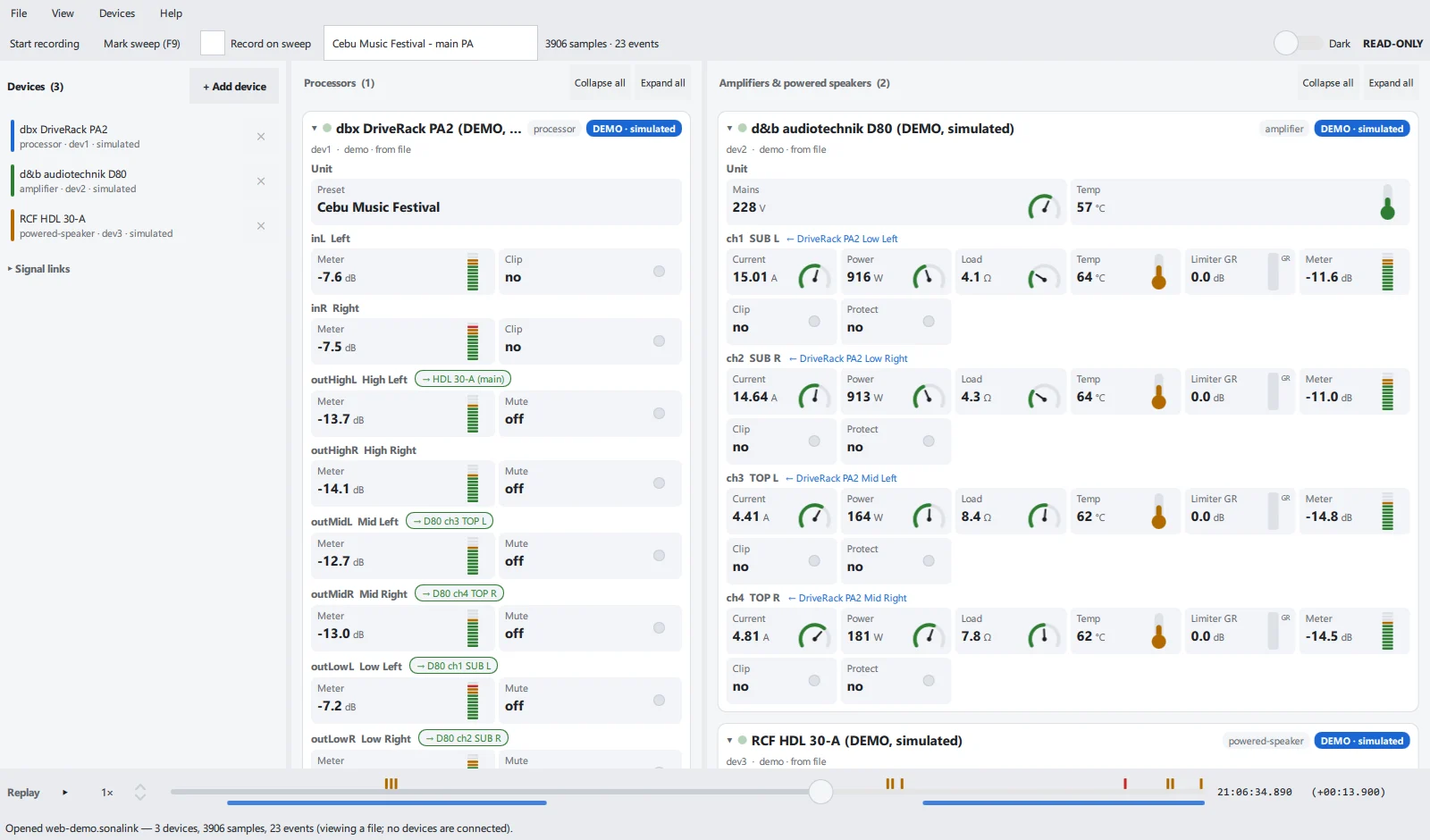
Open a saved recording and drag through time: every card shows the PA as it was. Blue bars are sweeps; amber and red marks are limiter and protect events.
Devices
Any brand, within the manufacturer’s rules
SonaLink reads a device the way its own software would, or imports a file that software exported. Open standards first; protocols that are not published are labelled decoded, unofficial; closed and encrypted ones are left alone.
| Route | Devices | Reads |
|---|---|---|
| AES70 (OCA) | d&b audiotechnik, Dynacord, Bosch and others — found on the network automatically | Whatever sensors the device publishes |
| SNMP | Amplifiers, power distribution and switches with the standard sensor table | Temperature, mains, current, power, clip and fault flags |
| Phase Lab LEGACY 4.8 | AD Pro Audio, over RS-232 | Gain, mute, preset — from the published protocol |
| DriveRack PA2 | dbx, over the network | Levels, clip, mutes, preset — decoded, unofficial |
| Demo | A PA2, a d&b D80, an RCF HDL 30-A and more, simulated | Try every feature with no hardware |
Read-only
It cannot change your rig. Not by accident, not ever.
Every driver carries a list of the commands it may send, and every one of them is a read. Anything else is refused inside SonaLink before it reaches the cable — and the tests that prove it run on every release.
- No gain, mute, preset or EQ is ever written.
- No password, encryption or licence on any device is ever bypassed.
- Device passwords are typed by you, used once, never stored.
Pricing
Watching is free. Recording for Sonasync is the licence.
Monitor
Free
- Every device, every card, live
- Demos and signal links
- Open and replay recordings
With Sonasync
Record
Licence
- Record, save and export
.sonalink - Sweep markers and pre-roll
- Thirty days free from the first run
A licence is a small signed file, checked on your computer only — no account, no online activation. A Sonasync licence does not unlock SonaLink.
What changed
1.0.0 — the first release
- Live cards for every device Needle gauges, thermometers, level bars with peak hold, limiter bars and clip / protect / fault LEDs.
- Processors and amplifiers, side by side Signal links show which output feeds which amplifier, coloured by that amplifier’s state.
- AES70, SNMP, Phase Lab and DriveRack PA2 AES70 devices are found on the network automatically.
- Recording for Sonasync
10-second pre-roll, sweep markers (F9), one
.sonalinkfile — Sonasync stays air-gapped. - Replay Drag through a saved recording and see the PA as it was.
- Windows and Linux
Windows installer, plus
.deband.rpm.
Show previous releases
None yet — 1.0.0 is the first release of SonaLink.
Download
Thirty days of recording. Monitoring for good.
When the thirty days are up nothing shuts down: the cards still run and saved recordings still open. What asks for a licence is recording and saving.
Download for Windows Download the manual (PDF)Linux: .deb (Debian, Ubuntu 24.10+) · .rpm (Fedora 39+). Needs Qt 6.5 or later.
From a real rig
Which amplifiers you run, which readings you rely on, what you would like SonaLink to read next — reports from real rigs decide what comes in the next release.
Send a report